LaraBuilder
Laravel Drag&Drop site builder - version 6.4.0
Introduction
- Item Name : Larabuilder - Laravel Drag&Drop site builder
- Item Version : v6.4.0
First of all, Thank you so much for purchasing this item and for
being my loyal customer.
You are awesome!
You are entitled to get free lifetime updates to this product +
exceptional support from the author directly.
This documentation is to help you regarding using the item as you should and like you want. Please go through the documentation carefully to understand how this item is made.
Requirements
You can run this script on any server like Linux, Windows or Uinix Server. But you need to meet some server requirements for installing and running this script.
This System built with Laravel 8+ that's why you must meet the following server requirements:
You will need the following sofwares to setup this item.
- PHP >= 7.3
- BCMath PHP Extension
- Ctype PHP Extension
- JSON PHP Extension
- Mbstring PHP Extension
- OpenSSL PHP Extension
- PDO PHP Extension
- Tokenizer PHP Extension
- XML PHP Extension
No support is provided for server installation, but paid support for this is available for $20. for server setup requests please create ticket here: https://support.spotlayer.com/help-center
Larabuilder Features #back to top
Cargo pro is a multilingual system to monitor the logistics and handling of the cargo until its final destination.
- SaaS Module, with membership subscription
- Easy to use drag & drop builder
- +400 professionally designed blocks allowing you to start building sites and pages instantly
- Extend LaraBuilder Lite by easily adding your own custom blocks
- Edit images, links, styles and content
- Export your sites including all assets like Javascript files, CSS files and images.
- Publish your sites/page directly to a live server using FTP, allowing you to use LaraBuilder as a light CMS
- Create and Edit Subdomain & Custom domain
- Create user accounts for your users to access LaraBuilder
- Easy to use settings page to configure the application
- Installer script for easy automatic installation
- Everything combined in a beautifully designed interface!
- Clear and concise documentation
- Back-end is built on Laravel
- alot more you can figure...
How to Install Larabuilder #back to top
Getting Started
Step 1
First of all you need to login your cpanel. After that you need to create a MySQL database as well as databse username and password.
Step 2
In this step you need to access your File Maneger and upload all files into your public_html directory. You can upload it any sub directory. Example: public_html/larabuilder. After that you need to extract the zip file and move all files from larabuilder directory to your installation directory.
In this step you need to put the app url into your browser. If you upload all files to your public_html/larabuilder directory then your URL will be http://yourdomain.com/larabuilder/ otherwise if you upload all files under public_html directory then your app URL will be http://yourdomain.com after that installer will run automatically like bellow:

Step 4
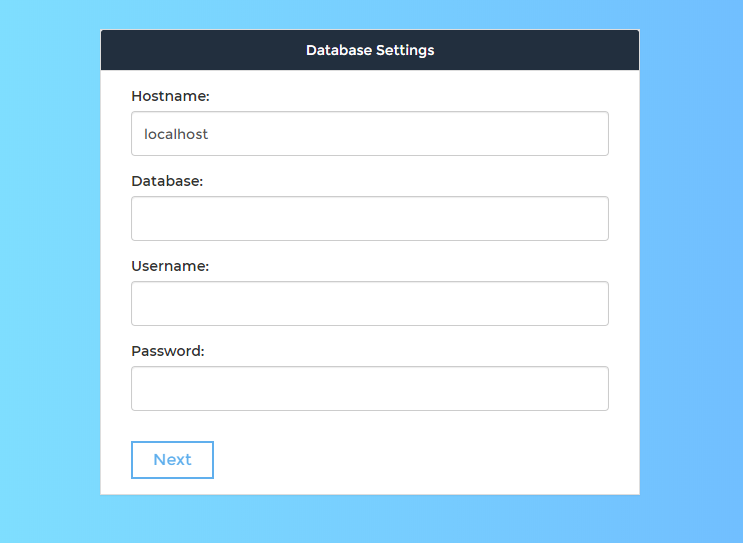
Click Next and put correct database details in this step.
Make sure to empty your database before complete this step
Step 5
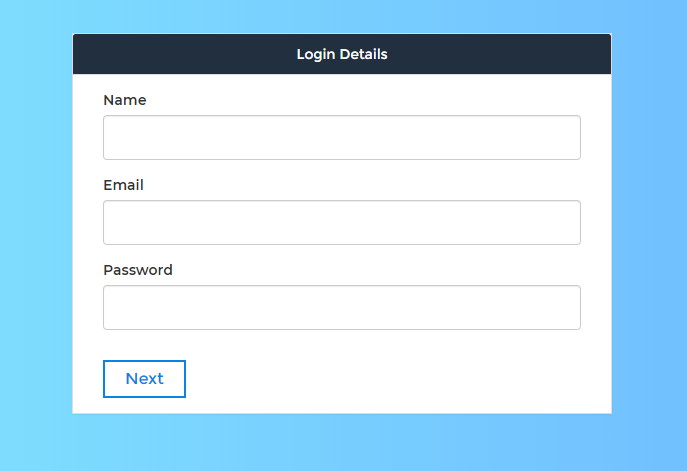
Click Next and put super admin login details in this step.
Step 6
Click Next and enter some system settings information in this step.

Step 7
Click Finish button. After that you need to login super admin account.

Step 6
Setup Recaptcha Account
go to this url: https://www.google.com/recaptcha/admin/create
Register with your email
Set your information like this, then save

Copy your Site Key and Secret Key from here
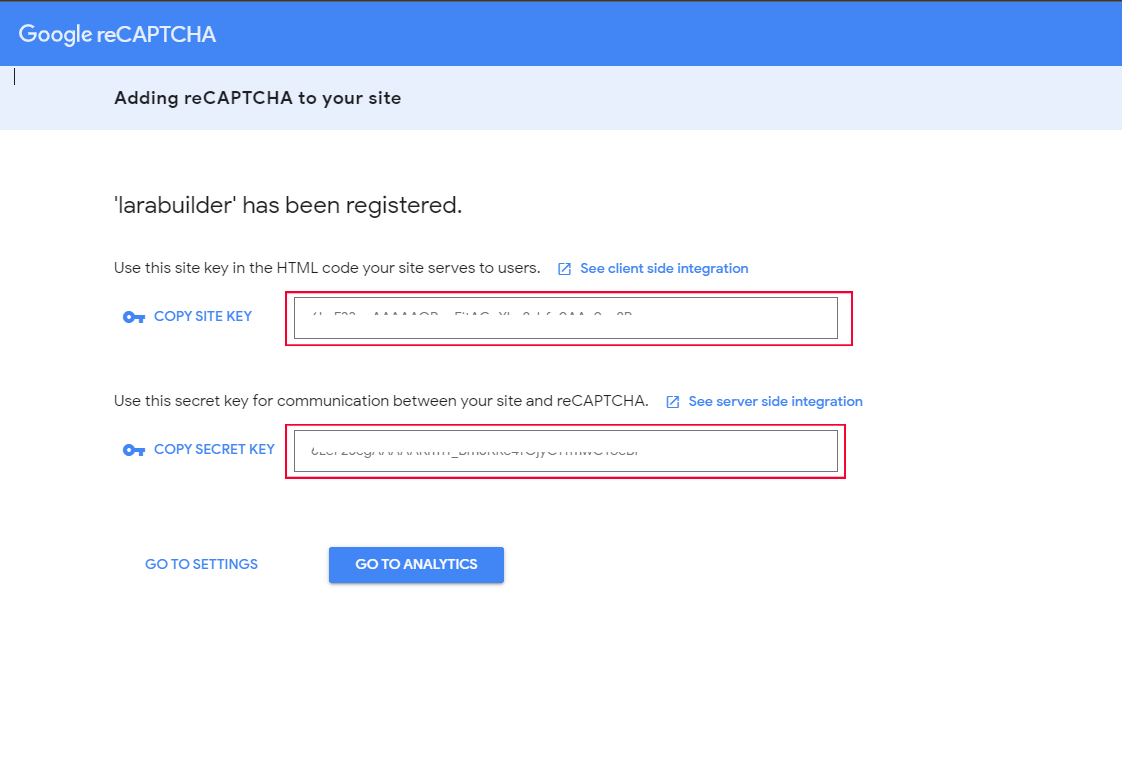
Then in your website dashboard go to -> Administration -> General Settings -> Recaptcha Settings
Then paste your keys and save

Step 7
Setup Cron Jobs
You need to Setup Cron Jobs for some schedule task. You need to run Cron Jobs minimum 2 times per day. You will get Cron Jobs URL from Administration > General Settings > Cron Jobs
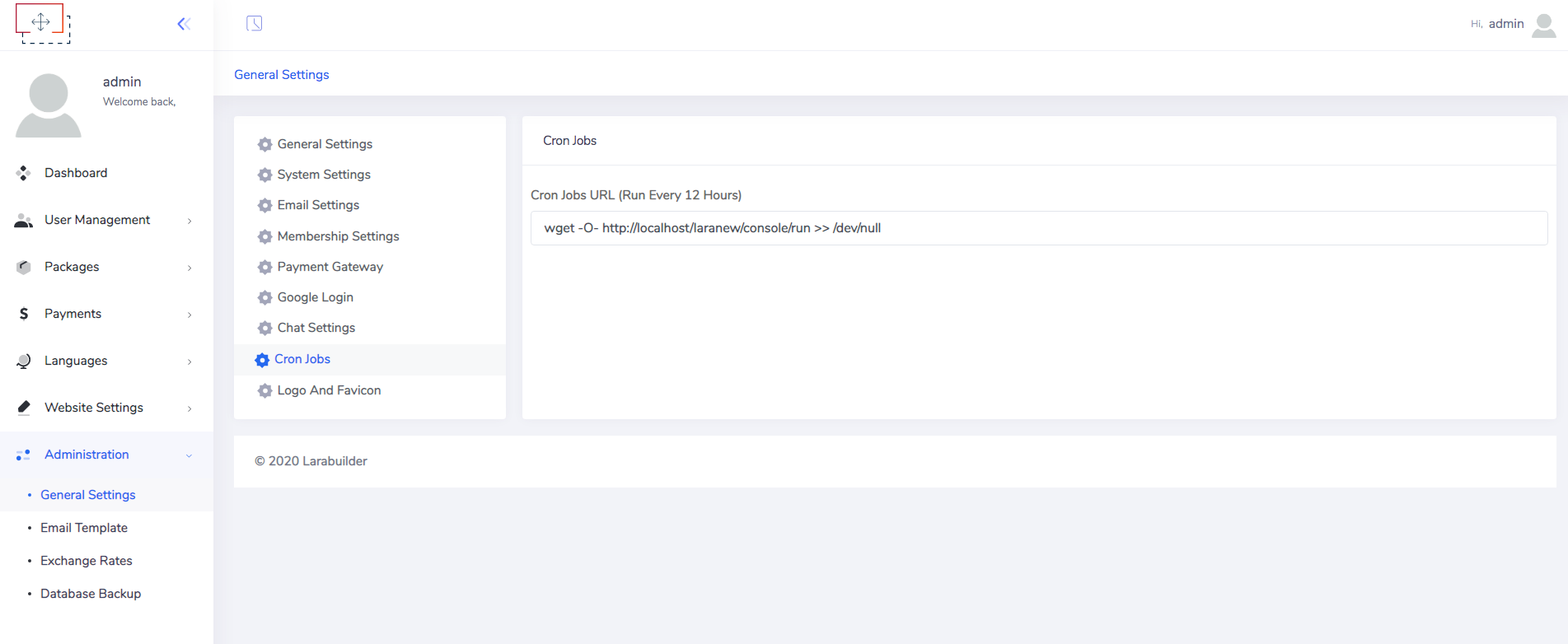
* after finish installation don't forget to create empty (tmp) folder inside public directory
How to Use Larabuilder #back to top
After successfully completed the installation process this is some of what you can use the system for.
General Settings
After login to super admin account you need to setup all settigs like email settings, Memebrship settings, currency, logo, favicon etc.

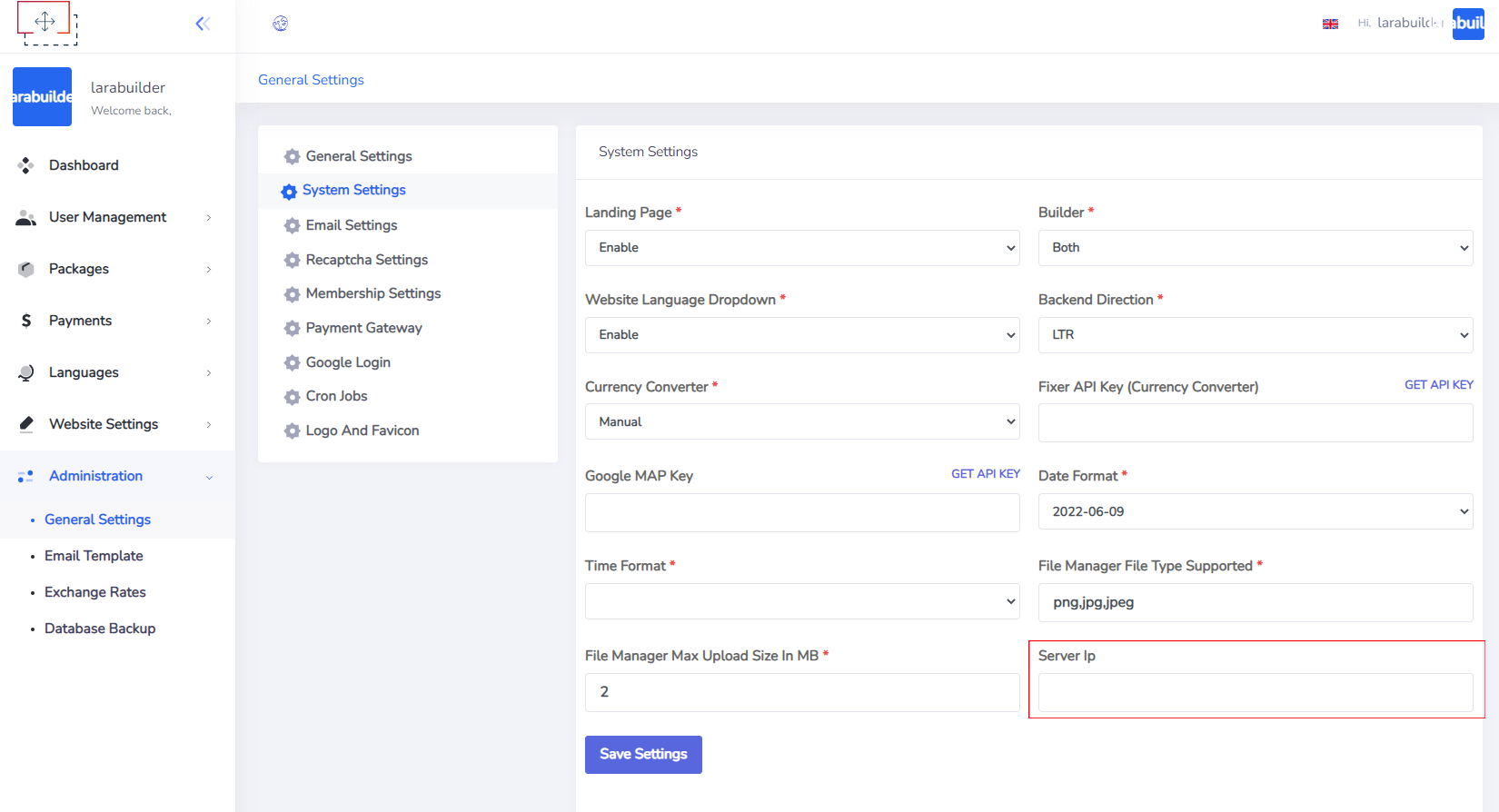
Server IP
You can change your Server IP from this page.
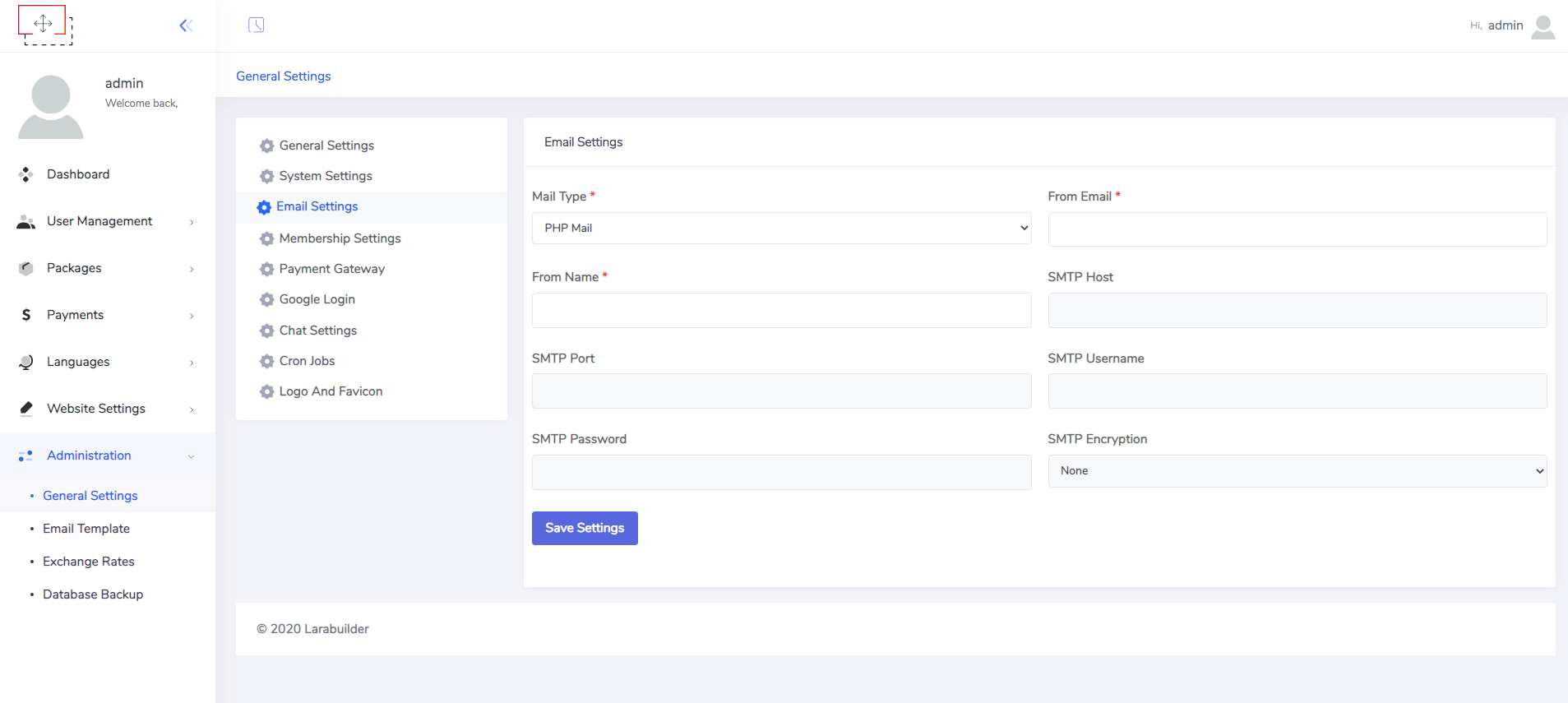
Email Settings
This is very important settings. You can use php mail or SMTP. PHP mail may not work in some hosting, so in that case you need to use SMTP email service.
Membership Settings
You can enable/disable membership, set trial period, subscription currency, email verification from this page.

Payment Gateway
This script support PayPal and Stripe for subscription package. You can configure your payment gateways from this page.

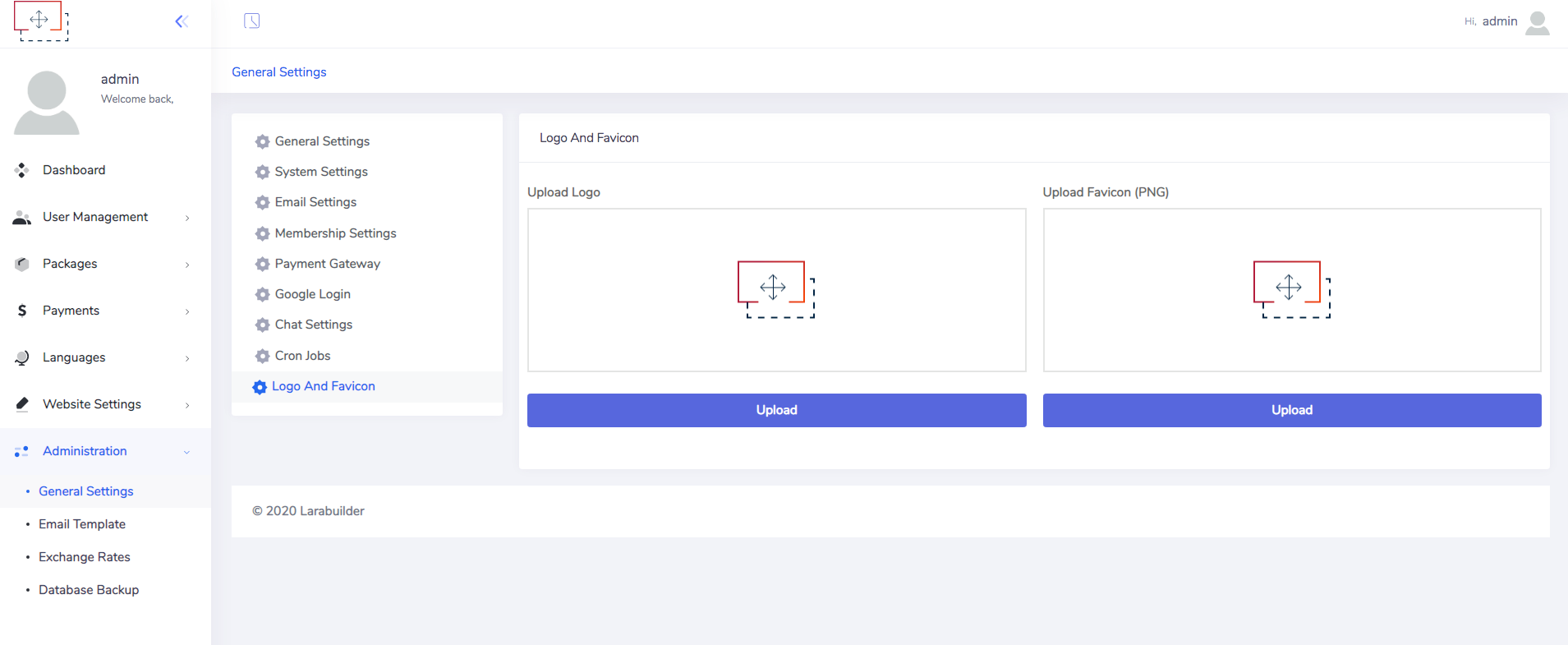
Logo & Favicon
You can change your logo and favicon from this page.
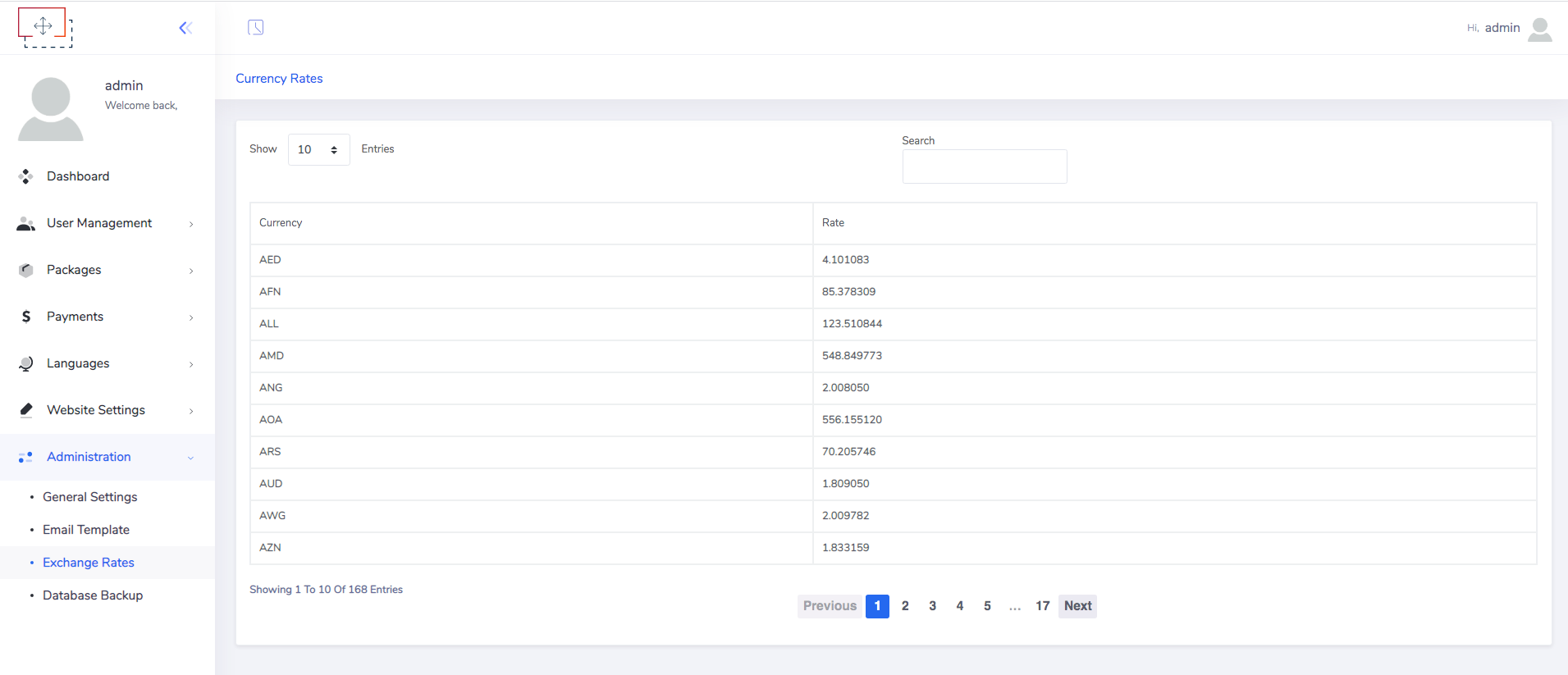
Currency Settings
This system support multi currency. So You can manage currecny rate manually or you can use fixer.io API from fixer.io. If you want to manage currency rate manually then you can edit exchange rate from Administration > Exchange Rate. You can't edit exchange rate if you use fixer API.
The Page builder. #back to
top
it's a tool for creating stunning web pages in a minutes. It is designed so that you can create pages without touching a single line of code. The main interface of Supra consists of 3 modes: sections mode, edit mode, project mode. Let's look at this in detail.
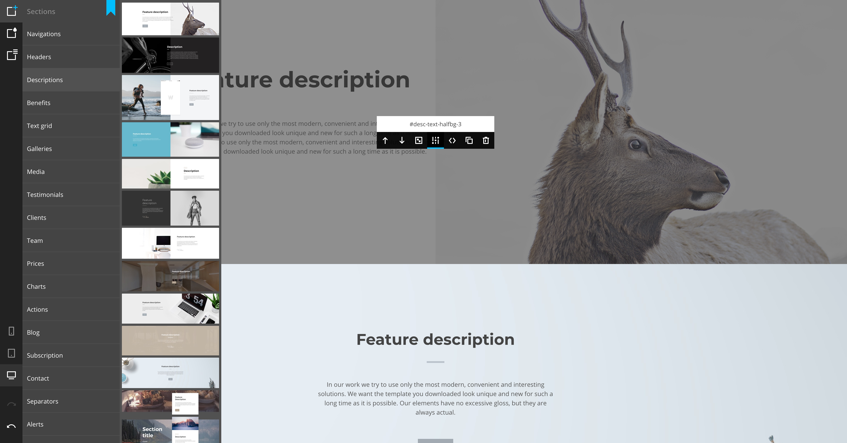
Sections mode
In this mode, we can add sections, delete, copy and configure them. To enable this mode - select the top icon in the left panel. To display the section options, just point to it in the work area and choose wished action.
Edit mode
In this mode, we edit the elements globally (changing the parameters for all the like elements) and locally (changing one specific element).
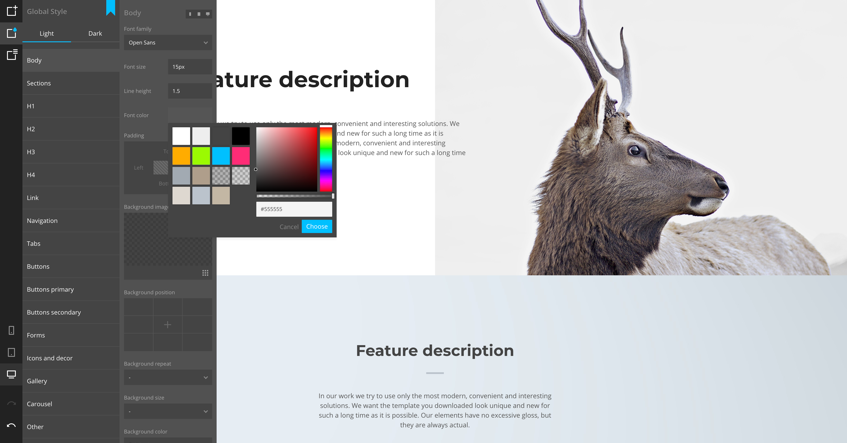
Global editing
For global editing, just select this mode (the second icon is on top of the panel) and select the element you want to edit from the list (see screen below).
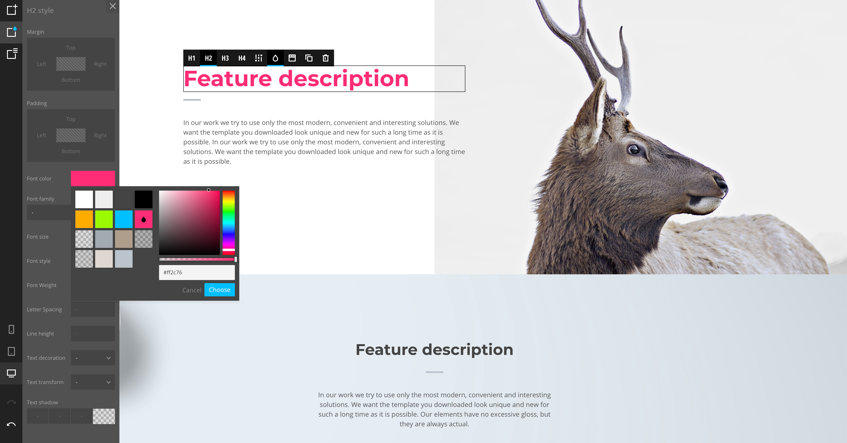
Local editing
For local editing, simply click on the element you want to edit and select the desired action from the appeared control buttons. You can change the format of the element (for example, H1 - H4), add animation, work with style settings and prepare classes, copy and delete. If the element contains text, then a text editor will appear on the double-click on it. Some specific elements have special options (for example: images, forms, counters, video and map iframes).
Project mode
Here you can customize the pages, copy them, delete or add new ones. You can also manage the project: save, load, create new one or export the finished project in html format.

Create new section
The best way to create a section - find a similar (in already existing) as a base and copy it in that path (larabuilder/public/backend/assets/builder/sections). All sections should have a unique name/ID. So, you need to change: section ID in the html code, folder name, thumbnail name (in the section folder). All of them should be named the same and don't forget to change IDs in style.css (if it exists).

Congrats! Now you have a platform for your new section. To modify the html code of the section use index.html (located in the section folder). If you want change/add CSS code - use style.css (located in the section folder). For javascript - use custom.js (located in the section folder). If there is no style.css or custom.js - you have to create them yourself.
You can change the order of sections (and groups) in order.xml (located in the builder root folder).
Sudomain #back to top
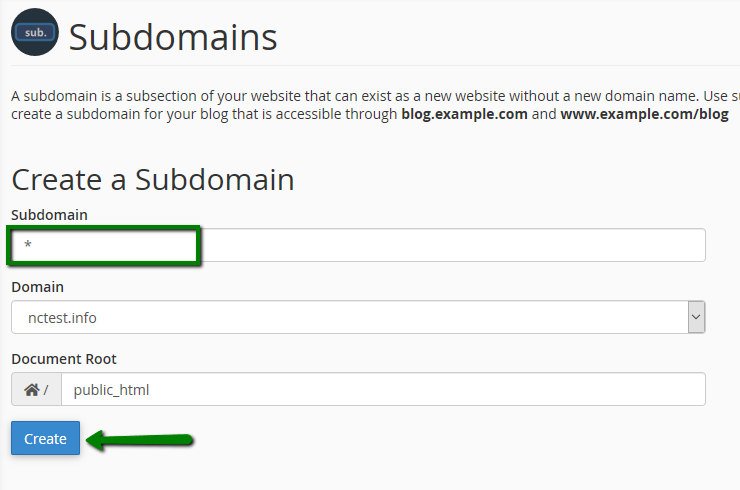
You will have to configure your server so that you can use the subdomain feature for your users.
Configure server
Activate a wildcard subdomain in your cPanel, you can follow this post.
For any other server's control panel, you can search how to activate a wildcard subdomain for your server or for much faster solution you can contact your host administrator to activate it for you.
How's your user use the subdomain feature?
From project settings page your user can add his custom subdomain so that he can use it for preview his project or publish it.
Custom Domain #back to top
STEP 1: Customer save custom-domain in landing page

STEP 2: Customer add a DNS record on their domain

STEP 3: Admin domain with customer domain on cpanel
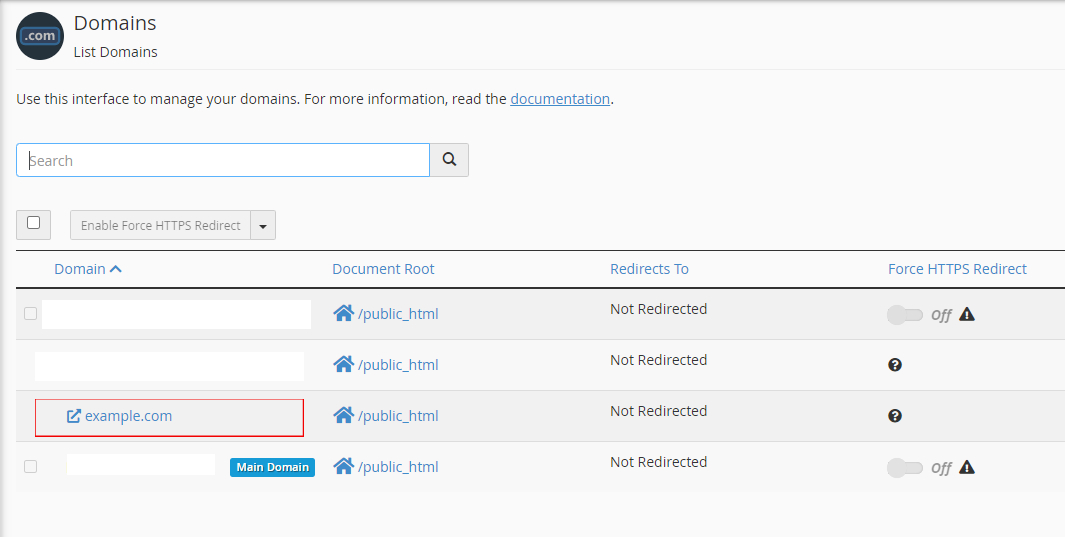
You can skip to step 3 with a VPS (Apache)
Config your VPS Apache with this VirtualHost. ( Change your domain yourdomain.com and your app path: /var/www/your_app_path)
                                    #ServerAdmin [email protected]
                                    ServerName yourdomain.com
                                    ServerAlias *
                                    DocumentRoot /var/www/your_app_path


                                    Options Indexes FollowSymLinks
                                    AllowOverride All
                                    Require all granted
Upgrade #back to
top
Please check your version first before proceed with the following steps:
            -----------------------------------------------------------------------------------------
            Update to Version 6.5
            -----------------------------------------------------------------------------------------

            1 - Backup
                - the directory "public/uploads/project_files".
                - the directory "public/tmp".
                - the directory "public/sites".
                - .env file
            2 - Extract larabuilder.zip file.
            3 - Replace the backup which you took on the first step.
            4 - export your database and delete it (important * database should be empty before installation)
            5 - open your app url and complete istallation steps
            4 - If you want to keep your old data from version (6.4)
            - go to your database
            - delete it
            - import your exported database
            5- run composer update


            -----------------------------------------------------------------------------------------

            -----------------------------------------------------------------------------------------
            Update to Version 6.4
            -----------------------------------------------------------------------------------------

            1 - Backup
                - the directory "public/uploads/project_files".
                - the directory "public/tmp".
                - the directory "public/sites".
                - .env file
            2 - Extract larabuilder.zip file.
            3 - Replace the backup which you took on the first step.
            4 - export your database and delete it (important * database should be empty before installation)
            5 - open your app url and complete istallation steps
            4 - If you want to keep your old data from version (6.3)
            - go to your database
            - delete it
            - import your exported database


            -----------------------------------------------------------------------------------------
            Update to Version 6.3
            -----------------------------------------------------------------------------------------

            1 - Backup
                - the directory "public/uploads/project_files".
                - the directory "public/tmp".
                - the directory "public/sites".
                - .env file
            2 - Extract larabuilder.zip file.
            3 - Replace the backup which you took on the first step.
            4 - export your database and delete it (important * database should be empty before installation)
            5 - open your app url and complete istallation steps
            4 - If you want to keep your old data from version (6.2)
            - go to your database
            - delete it
            - import your exported database

            -----------------------------------------------------------------------------------------
            Update to Version 6.2
            -----------------------------------------------------------------------------------------

            1 - Backup
                - the directory "public/uploads/project_files".
                - the directory "public/tmp".
                - the directory "public/sites".
                - .env file
            2 - Extract larabuilder.zip file.
            3 - Replace the backup which you took on the first step.
            4 - export your database and delete it
            5 - open your app url and complete istallation steps
            4 - If you want to keep your data
            - import your exported database
            - import update.sql in your database

            -----------------------------------------------------------------------------------------
            Update to Version 6.1
            -----------------------------------------------------------------------------------------

            1 - Backup
                - the directory "public/uploads/project_files".
                - the directory "public/tmp".
                - the directory "public/sites".
                - .env file
            2 - Extract larabuilder.zip file.
            3 - Replace the backup which you took on the first step.
            4 - If you want to keep your data
                - import update.sql in your database
            5 - If you want to change your data
                - delete old database columns
                - import database.sql in your database

            -----------------------------------------------------------------------------------------
            From Version 5.5 to Version 5.7
            -----------------------------------------------------------------------------------------

            1- Extract update.zip file.
            2- Replace the internal files in the same directories.
            3- Go to your database and import the update.sql file.

            -----------------------------------------------------------------------------------------
            From Version 5.0 to Version 5.5
            -----------------------------------------------------------------------------------------

            1- Backup the directory "public/uploads/project_files".
            2- Replace the internal directories (app, database, routes, public, resources) into the same directories in your system.
            3- Replace the backup of the directory "public/uploads/project_files" which you took on the first step.

            -----------------------------------------------------------------------------------------
            From Version 1.0 to 5.0
            -----------------------------------------------------------------------------------------

            - You must reinstall the system from scratch.
Version History (Changelog) #back to
top
You can find the version history (changelog.txt) file on The downloaded archive or you can check changelog on item sale page.
Once again, thank you so much for purchasing this item. As I said at the beginning, I'd be glad to help you if you have any questions relating to this item. No guarantees, but I'll do my best to assist. If you have a more general question relating to the items on CodeCanyon, you might consider visiting the forums and asking your question in the "Item Discussion" section.
Changelog
            -----------------------------------------------------------------------------------------
            Version 6.5 -
            -----------------------------------------------------------------------------------------
            -New.
                - Add Update feature from website.
                - Add Paddle Payment Gateway.
            - Fixes.
                - fix payment success redirect.
                - fix access url with different cases.
            -----------------------------------------------------------------------------------------

            -----------------------------------------------------------------------------------------
            Version 6.4 -
            -----------------------------------------------------------------------------------------
            - Fixes.
                - fix open different project after saving in some cases.
                - fix custom domain duplicate validation.
                - fix bug when update project settings
                - fix adding and updating External Link of type Image
            -----------------------------------------------------------------------------------------

            -----------------------------------------------------------------------------------------
            Version 6.3 -
            -----------------------------------------------------------------------------------------
            - New.
                - import from project to different project.
            - Fixes.
                - fix disable landing page.
                - fix login page when redirect to subdomain.
                - fix language issue.
                - enhance logo size.
                - add default profile image.
                - fix RTL BUGS.
                - fix subdomain validation.
            -----------------------------------------------------------------------------------------

            -----------------------------------------------------------------------------------------
            Version 6.2 - 18 June 2022
            -----------------------------------------------------------------------------------------
            - New.
                - Add Installation Steps.
                - Add Projects Control in admin dashboard.
            - Fixes.
                - fix user verification email.
                - fix pricing page redirection.
                - fixing smtp & php mail error.
                - fixing empty subdomain where adding custom domain and vice versa.
                - fixing PHP Version error.

            -----------------------------------------------------------------------------------------

            -----------------------------------------------------------------------------------------
            Version 6.1 - 18 June 2022
            -----------------------------------------------------------------------------------------
            - Ability to add Free Package.

            - fixing bugs:
                - fix attaching main domain with subdomain.
                - fix subdomain & main domain required when leave it empty.
                - fixing login & register page frontend issues.
                - fixing redirect when click on logo in login & register page.
                - disable sign up by url when make it disable from membership setting.
                - fix change websites_limits or company when edits package.

            -----------------------------------------------------------------------------------------

            -----------------------------------------------------------------------------------------
            Version 6.0 - 09 June 2022
            -----------------------------------------------------------------------------------------
            - Upgrading to Laravel 8+

            -----------------------------------------------------------------------------------------

            -----------------------------------------------------------------------------------------
            Version 5.9 - 06 June 2022
            -----------------------------------------------------------------------------------------
            - Adding custom domain feature for projects.
            - Adding Recaptcha feature to register page.

            - fixing bugs:
                - Can’t delete uploaded images / videos in FileManager.
                - Add Delete button to FIle Manager.
                - When press the Preview button, open subdomain / custom domain of project.
                - edit translation in language section in admin panel.
                - stripe cancel url.
                - fix video error in preview demo.
                - toggle images and videos active class in file manager.

            - adding recaptcha keys from admin dashboard.
            - adding IP Server from admin dashboard.

            -----------------------------------------------------------------------------------------

            -----------------------------------------------------------------------------------------
            Version 5.8 - 29 Jul 2021
            -----------------------------------------------------------------------------------------
            - Performance enhancement.
                - Preparing the system for the domain feature.
                - Minor bugs have been fixed too.

            -----------------------------------------------------------------------------------------


            -----------------------------------------------------------------------------------------
            Version 5.7 - Mar 16th, 2021
            -----------------------------------------------------------------------------------------
            - Adding subdomain feature for projects.
            - Minor bugs have been fixed too.

            -----------------------------------------------------------------------------------------
            Version 5.6 - Feb 21th, 2021
            -----------------------------------------------------------------------------------------
            - Minor bugs have been fixed too.

            -----------------------------------------------------------------------------------------
            Version 5.5 - Jan 23th, 2021
            -----------------------------------------------------------------------------------------
            - Fixing "save/export/download" functions on the builder on some Servers.


            -----------------------------------------------------------------------------------------
            Version 5.3 - Dec 26th, 2020
            -----------------------------------------------------------------------------------------

            *Critical Update*
            - Fixing bug missing file on the last update making crash on loging user after save project.

            -----------------------------------------------------------------------------------------
            Version 5.2 - Dec 23th, 2020
            -----------------------------------------------------------------------------------------

            - Clearing code and removing all files not in use.
            - Change the preview algorithm to be seperated for every user and every project
            - Other minor bugs have been fixed too.


            -----------------------------------------------------------------------------------------
            Version 5.2 - Dec 23th, 2020
            -----------------------------------------------------------------------------------------

            - Clearing code and removing all files not in use.
            - Change the preview algorithm to be seperated for every user and every project
            - Other minor bugs have been fixed too.

            -----------------------------------------------------------------------------------------
            Version 5.1 - Dec 3nd, 2020
            -----------------------------------------------------------------------------------------

            - Another patch for uploading image fix in different servers

            -----------------------------------------------------------------------------------------
            Version 5.1 - Dec 3nd, 2020
            -----------------------------------------------------------------------------------------

            - Another patch for uploading image fix in different servers

            -----------------------------------------------------------------------------------------
            Version 5.1 - Dec 3nd, 2020
            -----------------------------------------------------------------------------------------

            - Another patch for uploading image fix in different servers

            -----------------------------------------------------------------------------------------
            Version 5.0 - Dec 2nd, 2020
            -----------------------------------------------------------------------------------------

            - Adding documentation for the builder
            - Adding documentation for creating custom sections in the builder
            - Fixing add to gallery function.
            - Fixing contact us form in the builder.
            - Fixing sub banner in the landing page.
            - Other minor bugs have been fixed too.

            -----------------------------------------------------------------------------------------
            Version 4.0 - Nov 30th, 2020
            -----------------------------------------------------------------------------------------

            - Combine two builder together.
            - Create option to choose between builders or make both available.

            -----------------------------------------------------------------------------------------
            Version 3.0 - Nov 26th, 2020
            -----------------------------------------------------------------------------------------

            - Completely changed the HTML builder, as we found a lot of bug on the previous builder.

            -----------------------------------------------------------------------------------------
            Version 2.0 - Nov 20th, 2020
            -----------------------------------------------------------------------------------------

            - Rebuild the application from scratch using Laravel 5.8
            - Created new module [Project Management]
            - Created new module [Subscripton Based System (SaaS)]
            - Created new module [Dynamic Pricing Plans]
            - Created new module [Integrated Landing Page]
            - Created new module [Multi Language Supported]
            - Created new module [Many More . . .]


            -----------------------------------------------------------------------------------------
            Version 1.0 - Jan 9th, 2020
            -----------------------------------------------------------------------------------------

            - initial
Support
- Support Will provide from our Ticket system.
- Support Link https://support.spotlayer.com/help-center
- Support Will not cover any types of customization.
- If you need any customization then extra cost will be charged.
- Single license support will provide for one single domain.
Copyright and license #back to top
For more information about copyright and license check codecanyon.net/licenses.